 MuteBand
Install
Install MuteBand; the separation models (about 3.5 GB) are downloaded. No extra audio driver needed.
Download VB-CABLE ↗Turn down an instrument in the music playing on your PC. Pick up yours, and play along.
Free download from Microsoft Store · no card needed · 7 days · Guitar and Vocals, 45 seconds per song. The Mac version is on the App Store.
⊞ For Windows 10 & 11 · Graphics card with 6 GB+ required
⌘ macOS 14.2+ · Apple Silicon (M1 or later) · on the Mac App Store
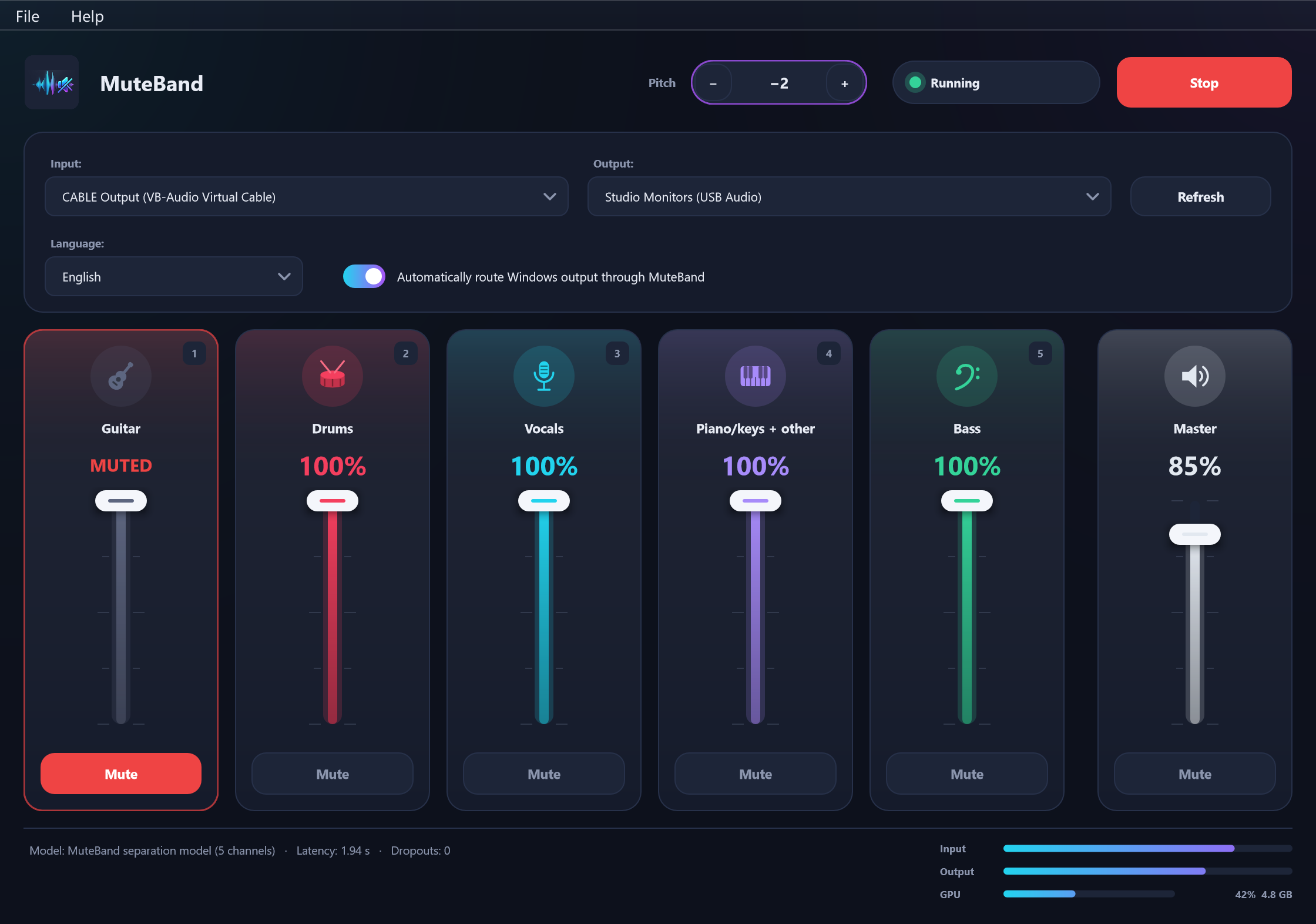
MuteBand for Windows · Actual app interface
Keep your favourite player. Make space for the part you want to practise.
Install MuteBand; the separation models (about 3.5 GB) are downloaded. No extra audio driver needed.
Download VB-CABLE ↗Enter your license key once. Leave Input on “System audio”, choose your headphones or speakers as output, press Start and play your music.
Mute or turn down an instrument, pick up yours, and play along.
Before you buy, see how MuteBand runs on your computer with the free trial.
| Free trial (Windows) | Full version | |
|---|---|---|
| Channels | Guitar and Vocals | Guitar, Drums, Vocals, Bass, Piano/keys + other |
| Channels turned down at once | 1 | 2 |
| Per song | 45 seconds | Unlimited |
| Time | 7 days | No time limit |
| Pitch shift (−12 / +12) | Yes | Yes |
| Download | About 1.4 GB | About 3.5 GB |
| Platform | Windows | Windows · Mac (App Store) |
| Price | Free, no payment details | One-time 10.99 USD |
Guitar, Drums, Vocals, Piano/keys + other and Bass, with a master volume.
Shift the pitch from −12 to +12 semitones to suit the part you’re playing.
Use the music already playing on your PC — Spotify, YouTube or any other player.
Separation runs locally on your graphics card. Your audio never leaves your computer.
The app supports English, Turkish, German, French, Spanish and Italian.
MuteBand works with the music already playing on your computer.
Windows 10 (2004+) or Windows 11, 64-bit; or macOS 14.2 or later on a Mac with Apple Silicon (M1 or later).
DirectX 12 graphics card with at least 6 GB of video memory (NVIDIA, AMD), or an Intel Core Ultra processor with Intel Arc graphics.
8 GB RAM (16 GB with Intel Arc integrated graphics) and about 5 GB of free disk space.
Needed during installation (about 3.5 GB download) and to activate the license. MuteBand then works offline for up to 30 days.
No extra audio driver is needed on Windows; MuteBand takes the sound playing on your computer directly. If you stream or record, you can optionally use VB-CABLE (see the FAQ).
About 2 seconds on fast cards; about 3 seconds on slower laptops. This delay suits playing along. Fast cards can mute up to two channels at once; use fewer on slower computers.
Yes. It processes the audio already playing on your Windows computer, including Spotify, YouTube and other players.
Yes. Sound is a few seconds behind the original: about 2 seconds on fast graphics cards and about 3 seconds on slower laptops.
No. Audio separation happens locally on your graphics card; audio never leaves your computer.
While it runs, MuteBand turns other apps down to their lowest level in the Windows volume mixer and plays the separated sound itself; the levels return when MuteBand closes. Programs that capture computer audio (OBS desktop audio, Discord screen share, Zoom “share computer sound”) therefore get very quiet audio. If you stream or record, install the free VB-CABLE driver and choose “CABLE Output” as MuteBand’s Input; in your recording program, pick your headphones or speakers as the audio device. Microphone recording is not affected.
No, it's the same app. The free 7-day trial and your license key work in both. The Store version installs without the Windows SmartScreen warning and is updated by the Store. One thing to remember: before you uninstall the Store version or move to another PC, open License → Remove from this computer, so your license is released for the new PC.
Download MuteBand for free from Microsoft Store and open it. If you bought it, enter the key from your e-mail in the License panel; the full separation models (about 3.5 GB) are downloaded. To try it, choose “Try free for 7 days” (about 1.4 GB). You need an internet connection and about 5 GB of free disk space.
Yes. This only appears for the installer from our website, because Windows doesn't know the new program yet; it is not a virus warning. Click "More info", then "Run anyway". The Microsoft Store version never shows this warning, so we recommend installing from the Store.
A one-time purchase gives you a license key by email. One license works on one computer; to move it, remove it from the old computer in the app (License > Remove from this computer). The app checks the license online and works offline for up to 30 days.
Yes, free for 7 days on Windows: download MuteBand from Microsoft Store and choose “Try free for 7 days” when it starts. The trial lets you use the Guitar and Vocals channels, one channel at a time, for 45 seconds per song; it downloads about 1.4 GB. The full version has all five channels, two at once and no time limit. After 7 days the trial files are removed; buy MuteBand (one-time 10.99 USD) and enter your key to download the full version. One trial per computer.
Yes. MuteBand is on the Mac App Store: it needs macOS 14.2 or later and a Mac with Apple Silicon (M1 or later). On the Mac you don’t need VB-CABLE; macOS asks for system audio recording permission on first launch. The Mac version is bought separately on the App Store, and its refunds go through Apple.
Make room for the part only you can play.
One-time purchase · 10.99 USD · 7-day free trial · 14-day refund
Mac: on the Mac App Store, at the App Store price
MuteBand is not available in the United States or South Korea.
The United States restriction includes its territories.